



POCO M4 Pro Mediatek Dump File dengan codename Fleur merupakan complete dump yang dapat digunakan untuk proses device recovery pada perangkat yang mengalami berbagai masalah software. Dump ini sangat berguna untuk menangani kasus seperti bootloop, system error, hingga kebutuhan UFS restore agar device kembali normal.
Dump POCO M4 Pro Fleur ini dibackup menggunakan MipiTester Gear 2, sehingga struktur data tersimpan dengan rapi, akurat, dan ready for advanced repair process oleh teknisi.
Artikel ini adalah bagian dari halaman Kumpulan File Dump Xiaomi – Tested 2025
📋 Detail POCO M4 Pro Mediatek Dump File
- Device: POCO M4 Pro (Fleur)
- Backup Tool: MipiTester Gear 2
📂 Dump File Contents
- 🔹 LUN Only Folder
- 🔹 XML File Folder
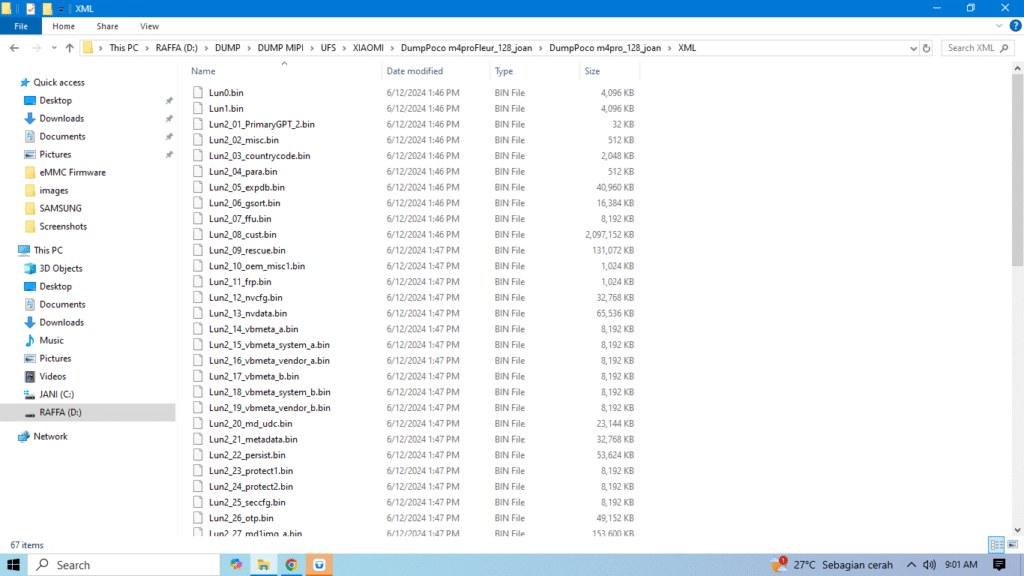
🛠️ Cara Write File Dump POCO M4 Pro (Fleur)
1️⃣ Backup NV before starting (mandatory to avoid IMEI lost).
2️⃣ Erase all LUN to make sure the UFS is completely clean.
3️⃣ Extract dump files into an easy-to-access folder.
4️⃣ Write files from the “LUN Only” folder.
5️⃣ Go to Factory Image, load the folder containing XML files, then write all partitions.
6️⃣ Restore NV that was previously backed up.
🚀 After completion, the device should return to normal condition.
🎯 Download POCO M4 Pro Mediatek Dump File (Fleur):
🔗 Link Download Dump Poco M4 Pro
🔑 Password: jani1306
⚠️ Important Note:
Always backup NV before execution to prevent loss of IMEI or other critical data.
Untuk kawan yang membutuhkan NV File Xiaomi, bisa ke halaman Kumpulan File NV XIAOMI MediaTek
🎥 Video Proses Repair & Ganti UFS
Untuk melihat proses repair dan penggantian UFS Poco M4 Pro (Codename: Fleur) secara lebih lengkap, Anda dapat melihat proses pengerjaannya melalui video berikut.
Dalam video ini diperlihatkan proses menggunakan MipiTester Gear 2, mulai dari proses repair UFS hingga penggantian UFS pada Poco M4 Pro Fleur.
👉 Tonton video:
Semoga bermanfaat dan bisa membantu proses repair kalian.
Don’t forget to share ke sesama teknisi kalau info ini berguna 🔥
🔧 Need File Dump for Redmi 10C?
Kami juga menyediakan File Dump Redmi 10C (codename: Fog) yang dapat digunakan untuk flashing, bootloop repair, hingga UFS recovery.